Why Architecture Matters
As apps grow, architecture becomes one of the key factors that decides whether the project stays manageable or turns into chaos.
I started getting serious about software architecture about a year ago, but it was in early 2025 that I encountered something that reshaped how I see SwiftUI development: the Swift Composable Architecture (TCA).
In this series, I’ll share not only the official theory, but also what I’ve discovered through real practice, including some aha moments and things I wish I knew earlier.
What is Swift Composable Architecture (TCA)?
The Swift Composable Architecture (TCA) is a library and a design pattern created by Brandon Williams and Stephen Celis, the team behind Point-Free.
TCA was designed to help developers manage complex state, side effects, and navigation in a consistent, scalable, and testable way, especially as SwiftUI applications grow larger.
At its core, TCA gives your app a clear structure that controls how data moves and how logic is handled. This structure is strict on purpose. It forces you to define your state, actions, and effects in one place, and makes every update go through a predictable flow.
This may feel a bit rigid at first, but that’s also what makes it powerful. It helps prevent unexpected behavior, especially as the app grows. Instead of state being changed from anywhere, you always know where and why a change happened. It becomes easier to debug, easier to test, and easier for new developers to understand what’s going on.
The Core Components of TCA
Understanding TCA begins with understanding its key building blocks:
1. State
This is your app source of truth. It holds all the data your view needs to display. TCA encourages you to keep state in one place, so it’s easier to understand what’s going on and manage your app’s behavior.
2. Action
Actions represent everything that can happen in your feature. It can be things like button taps, API responses, or timer ticks. Actions describe what happened, and they are the only way to update state.
Writer Note:
Remember when we talked about how TCA is strict in a good way? This is one example. We can only update the state, especially the part that affects the view, by sending an action.
3. Reducer
A reducer is where you define the state your feature needs and the actions that can happen in that feature. It is responsible for handling how the app responds to each action.
Writer Note:
Later you’ll see that in TCA, a reducer is written as a Swift struct using the
[@Reducer](http://twitter.com/Reducer "Twitter profile for @Reducer")macro. But what really matters is what’s inside. It contains a function that takes the current state and an action, then returns a new state.
In a small feature, a reducer might only update the state based on actions. But in a real app, reducers often do more. You can use them to handle routing, access dependencies like a database client, or combine multiple small features into a larger one. We’ll explore that more when we get into routing and feature composition.
4. Store
The store is the object that connects everything in TCA. It holds the current state, lets your view send actions, and runs the reducer to update the state. In SwiftUI, you usually pass the store to your view, and the view reacts automatically whenever the state changes.
Writer Note:
Even though the store holds the full state of your feature (or even the app), you can limit what a view can access by using
store.scope. This lets you give the view only the part of the state and the actions it needs. For example, in aHomeView, you can scope the global store down to justhomestate and actions, so the view cannot accidentally read or send unrelated data from other parts of the app.
How TCA Flow Works
The flow of TCA can be summarized like this:
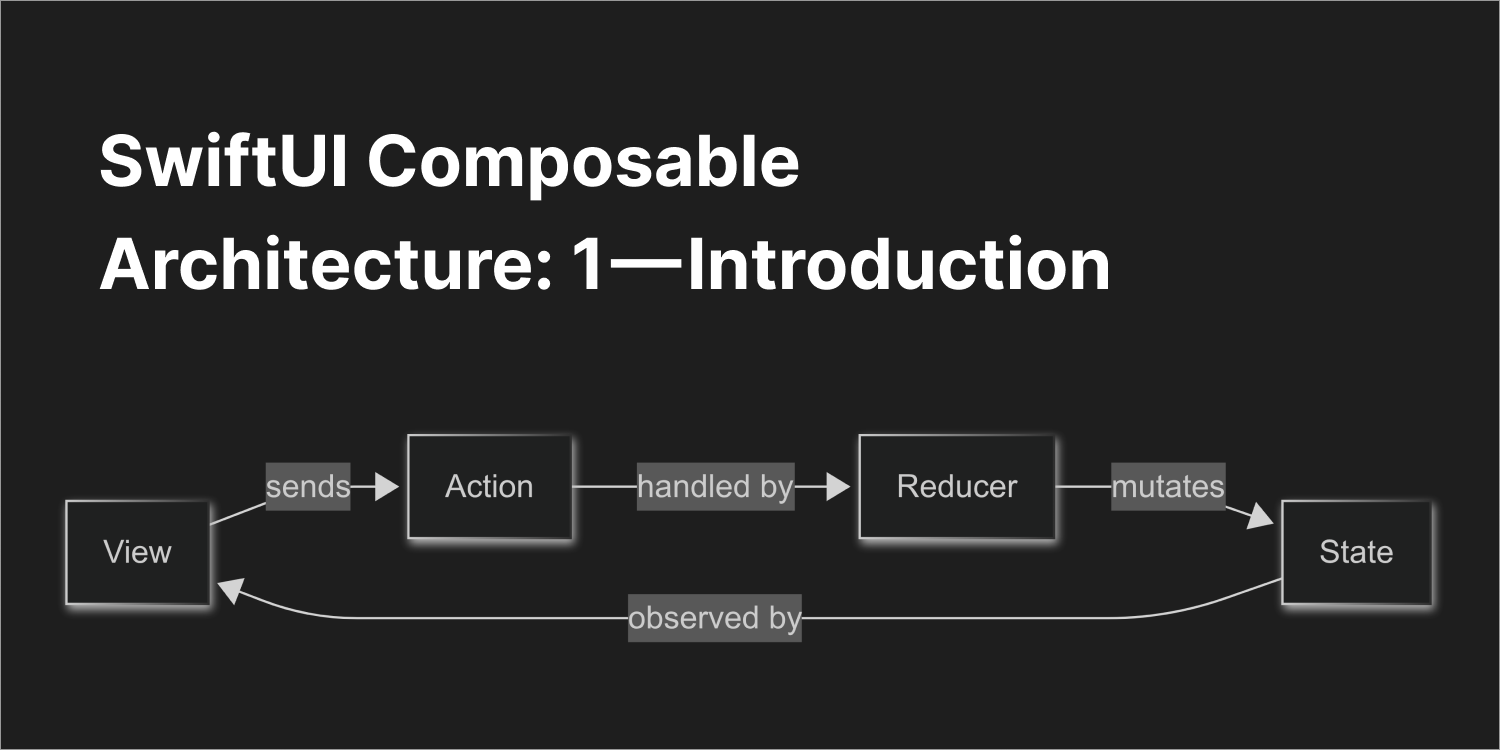
View → sends Action → handled by Reducer → mutates State → View updates

TCA Flow Diagram
The View reads the State, and sends Actions.
Reducers process Actions, update the State, and SwiftUI reactively updates the View.
Every movement is predictable and traceable.
When to Use TCA
TCA really shines in large or growing projects, especially when you’re working with a team. Since everything in TCA follows a strict and predictable pattern, it becomes much easier for multiple developers to understand how the app works, where the data lives, and how updates happen. Everyone follows the same structure, so there’s less room for confusion.
It also fits really well with SwiftUI. SwiftUI is all about reactive updates and unidirectional data flow and TCA gives you a solid structure for that. If you’re building a SwiftUI app that has multiple screens, shared state, or async effects like API calls, TCA can help you keep things organized and testable.
TCA vs MVVM
Before using TCA, I was mostly using MVVM + SwiftUI. I’d usually go with [@StateObject](http://twitter.com/StateObject "Twitter profile for @StateObject") or [@ObservedObject](http://twitter.com/ObservedObject "Twitter profile for @ObservedObject"), create a ViewModel, and pass data around. It worked but as the app grew, things started to feel messy.
In MVVM, I had to make decisions like:
- Should this logic go in this ViewModel or another?
- Who owns this piece of state?
- Where should this update be handled?
I’d end up with multiple functions updating different properties in different places, and eventually I’d lose track of what changed what until I had to dig through the debugger 😩
With TCA, that chaos disappears.
There’s a single source of truth: Store<State, Action>.
Instead of directly changing state, you send an action, and the reducer handles it. Reducers are where all logic lives so you always know where updates happen.
HIghlight:
- No more guessing where state is changed
- Clear separation of data, logic, and effects
- No ViewModel decisions to overthink
- No random state updates causing weird bugs
Writer Note:
But I know I can’t compare architectures this way. I use too few parameters to judge. MVVM and TCA will be best depending on what project we use, because each has its own pros and cons. Also, this section is very personal and based on my opinion, which is limited to my skill level. Maybe the confusion that came from using MVVM was just a skill issue XD
A Quick Look: What Does TCA Code Look Like?
To give you a quick idea of how everything comes together in TCA, here’s a very simple counter feature.
import ComposableArchitecture
import SwiftUI

@Reducer
struct CounterFeature {
    struct State: Equatable {
        var count = 0
    }

    enum Action: Equatable {
        case increment
        case decrement
    }

    var body: some ReducerOf<Self> {
        Reduce { state, action in
            switch action {
            case .increment:
                state.count += 1
                return .none

            case .decrement:
                state.count -= 1
                return .none
            }
        }
    }
}
And here’s how you use it in a SwiftUI view:
struct CounterView: View {
    let store: StoreOf<CounterFeature>

    var body: some View {
        WithViewStore(store, observe: { $0 }) { viewStore in
            VStack {
                Text("Count: \(viewStore.count)")
                HStack {
                    Button("−") { viewStore.send(.decrement) }
                    Button("+") { viewStore.send(.increment) }
                }
            }
        }
    }
}
What’s Next
Now that you’ve seen the core concepts of TCA and how the data flow works, it’s time to see it in action.
In the next part of this series, we’ll build a simple app using TCA step by step. We’ll define the state and actions, connect them with a reducer, and use a store to power a real SwiftUI view.
By the end of the next part, you’ll not only understand how to use TCA, you’ll feel confident starting to build with it.
Next Part : SwiftUI Composable Architecture: 2 — Create Simple App
From writer
Hello, allow me to introduce myself. I’m Cakoko. We’ve reached the end of this article, and I sincerely thank you for taking the time to read it. If you have any questions or feedback, feel free to reach out to me directly via email at cakoko.dev@gmail.com. I’m more than happy to receive your input, whether it’s about my English writing skills or anything, i might be wrong. Your insights will help me grow.
Looking forward to connecting with you in future articles! By the way, I’m a mobile developer currently pursuing undergraduate degree in computer science and an Apple Developer Academy @IL Graduate. I’m open to various opportunities such as collaborations, freelance work, internships, part-time, or full-time positions. It would bring me great happiness to explore these possibilities.
Until next time, stay curious, and keep learning!
Open for Feedback
This article is part of my personal learning journey. It might not be completely accurate or perfect, and that’s okay. I’m sharing what I’ve learned so far in the hope that it can help others who are exploring the same topics. If you have any feedback, suggestions, or corrections, I truly appreciate them. I’m always open to learning more and improving along the way.