In the previous articles, we explored [[SwiftUI Composable Architecture - 1 Introduction|TCA fundamentals]] and built a [[SwiftUI Composable Architecture - 2 Create Simple App|simple BMI Calculator app]] to understand the core concepts. That was great for learning the basics, but real apps have challenges that go way beyond simple state management.
Today, we’re going to break down Bako, my mood tracker app, to see how TCA handles tricky navigation, coordinates different features, saves data, and uses other advanced patterns you’ll run into in real-world apps.
You can access the github repository here: https://github.com/cakoko/Bako
or Trying the app here: https://apps.apple.com/id/app/bako-mood-tracker/id6741732090
By the end of this article, you’ll understand:
- Advanced navigation with
NavigationStackStoreandStackState - Multi-step user flows and feature delegation
- SwiftData integration with dependency injection
- Complex state management with optional child reducers
- Side effects and async operations
- Performance considerations
What We’re Analyzing:
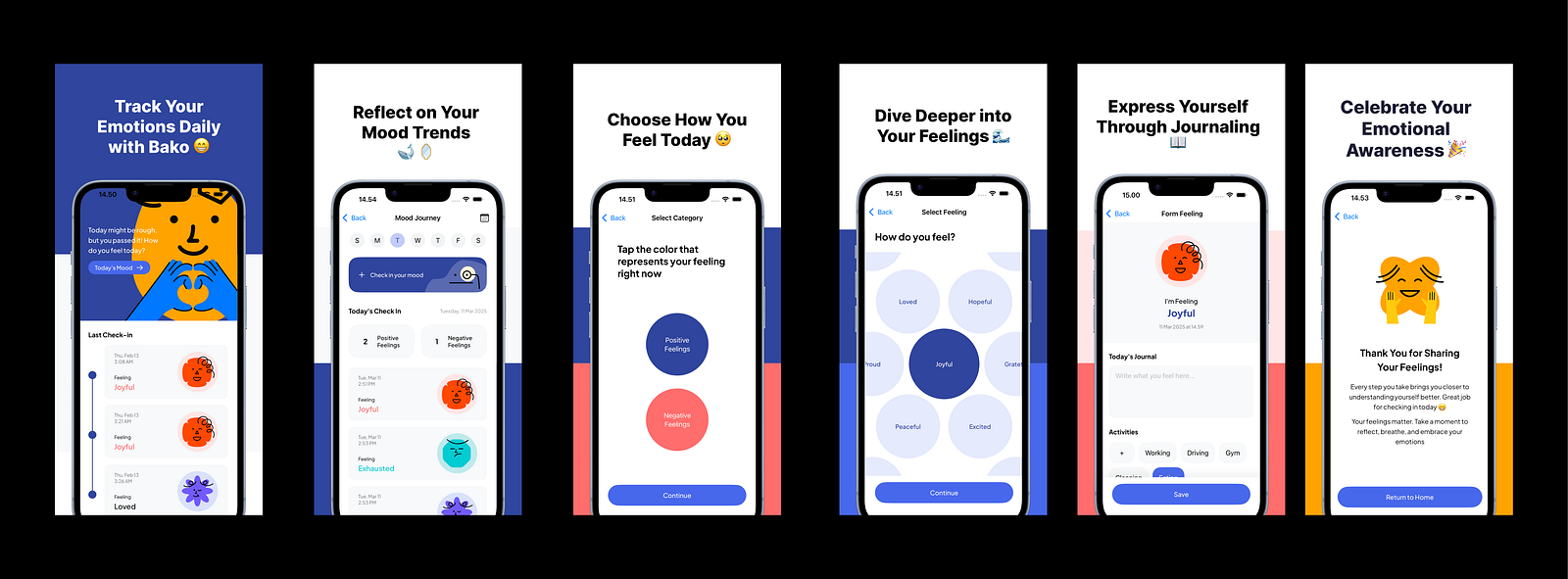
Bako is an emotion tracker that guides users through a multi-step flow:
- Onboarding → First-time user experience
- Home Screen → Dashboard with recent emotions
- Tracker → Daily mood check-in interface
- Category Selection → Choose positive or negative emotions
- Emotion Selection → Pick specific feeling with interactive UI
- Form → Add context (journal, activities, location)
- Success → Confirmation and navigation back to home
This is a good example of the kind of complex, multi-screen flows you’ll build in real apps.
Writer Note:
Instead of building from scratch like in part 2, we’re analyzing an existing app. This approach shows you how to understand TCA in a codebase you might take over or join as a team member.
Understanding the Project Architecture
Let’s start by looking at how Bako is structured.
Project Organization
Bako/
├── App/ # Core application layer
│ ├── BakoApp.swift # App entry point
│ ├── AppReducer.swift # Root reducer coordinating all features
│ ├── AppView.swift # Root navigation view
│ ├── AppDependencies.swift# Dependency injection setup
│ ├── AppModels.swift # SwiftData models registration
│ └── AppRoute.swift # Navigation routes definition
├── Features/ # Feature modules (isolated)
│ ├── Onboarding/ # First-time user experience
│ ├── Home/ # Main dashboard
│ ├── Tracker/ # Daily mood check-in
│ ├── SelectCategoryFeeling/# Positive/negative selection
│ ├── SelectFeeling/ # Specific emotion picker
│ ├── FormFeeling/ # Context input form
│ ├── SuccessSubmitFeeling/# Confirmation screen
│ └── DetailFeeling/ # View saved emotions
└── Core/ # Shared resources
├── Common/ # Reusable components & utilities
│ ├── Components/ # UI components
│ ├── Models/ # Data models
│ └── Enums/ # Shared types
└── Design/ # Assets and design system
This is a good example of feature-based architecture. Each feature has its own Reducer and View files. The App/ folder is the coordination layer that manages all the features, while Core/ holds shared resources.
Writer Note:
This structure scales really well. When you have 20+ features, each team member can work on their feature without conflicts. It also makes it easy to pull features out into their own modules or even separate apps if needed.
The Root Reducer: Managing Everything
Let’s see how the root reducer manages all the features:
@Reducer
struct AppReducer {
    @ObservableState
    struct State: Equatable {
        var path = StackState<Route>()          // Navigation stack
        var home: HomeReducer.State?            // Optional - loaded after onboarding
        var tracker: TrackerReducer.State?      // Optional - loaded on demand
        var onboarding: OnboardingReducer.State // Always present initially
        var selectCategoryFeeling: SelectCategoryFeelingReducer.State?
        var selectFeeling: SelectFeelingReducer.State?
        var formFeeling: FormFeelingReducer.State?
        var successSubmit: SuccessSubmitFeelingReducer.State?
        var detailFeeling: DetailFeelingReducer.State?
        var about: AboutReducer.State?
    }

    enum Action {
        case path(StackAction<Route, Never>)
        case home(HomeReducer.Action)
        case tracker(TrackerReducer.Action)
        case onboarding(OnboardingReducer.Action)
        // ... other feature actions
    }
}
You’ll notice most child states are optional. This is a super important pattern in real TCA apps:
- Always-present features (like
onboarding) are non-optional - On-demand features (like
tracker,formFeeling) are optional and created only when needed - This saves memory and keeps your state management clean.
Advanced Navigation Patterns
Bako uses one of TCA’s most powerful features for navigation: NavigationStackStore with programmatic navigation.
Stack-Based Navigation
struct AppView: View {
    let store: StoreOf<AppReducer>

    var body: some View {
        NavigationStackStore(
            store.scope(state: \.path, action: \.path)
        ) {
            // Root view logic
            WithViewStore(store, observe: \.home) { viewStore in
                if let homeState = viewStore.state {
                    HomeView(store: store.scope(state: \.home!, action: \.home))
                } else {
                    OnboardingView(store: store.scope(state: \.onboarding, action: \.onboarding))
                }
            }
        } destination: { route in
            // Route-based view presentation
            switch route {
            case .tracker:
                TrackerView(store: store.scope(state: \.tracker!, action: \.tracker))
            case .selectCategoryFeeling:
                SelectCategoryFeelingView(store: store.scope(state: \.selectCategoryFeeling!, action: \.selectCategoryFeeling))
            // ... other destinations
            }
        }
    }
}
This gives you full control over navigation from your code. Instead of relying on NavigationLink bindings, you push and pop screens by changing the path state.
Route Definition
enum Route: Equatable, Hashable {
    case tracker
    case selectCategoryFeeling
    case selectFeeling
    case formFeeling
    case successSubmit
    case details(EmotionModel)  // Routes can carry data
    case about
}
Routes can carry data (like details(EmotionModel)), making it easy to pass data between screens without a lot of messy state management.
Navigation Actions in Practice
Here’s how it actually works:
// In AppReducer
case .home(.delegate(.routeToTrackerView)):
    state.tracker = TrackerReducer.State()    // Initialize on-demand
    state.path.append(.tracker)               // Push to navigation stack
    return .none
case .tracker(.delegate(.routeToSelectCategoryFeeling)):
    state.selectCategoryFeeling = SelectCategoryFeelingReducer.State()
    state.path.append(.selectCategoryFeeling)
    return .none
Each feature signals its need to navigate using delegate actions. The parent reducer handles the actual navigation by:
- Creating the destination feature’s state
- Appending the route to the navigation stack
Writer Note:
This delegation pattern is really important for keeping features separate. Features don’t directly control navigation , they just say “I want to go somewhere” and let the parent decide how to handle it. This makes features more reusable and testable.
Multi-Step User Flows and Feature Communication
The emotion logging flow is a great example of how TCA handles complex user journeys with multiple steps.
The Complete Flow
Home → Tracker → Category Selection → Emotion Selection → Form → Success → Home
Each step is its own feature, but they need to pass data to each other and work together. Let’s see how this works.
Data Flow Between Features
Step 1: Category Selection
@Reducer
struct SelectCategoryFeelingReducer {
    @ObservableState
    struct State: Equatable {
        var selectedEmotionCategory: EmotionCategory?
    }

    enum Action: Equatable {
        case selectCategory(EmotionCategory)
        case continueButtonTapped
        case delegate(Delegate)

        enum Delegate: Equatable {
            case routeToSelectFeeling  // No data - category stored in state
        }
    }
}
Step 2: Emotion Selection
// In AppReducer - handling the move between screens
case .selectCategoryFeeling(.delegate(.routeToSelectFeeling)):
    let emotions = state.selectCategoryFeeling?.selectedEmotionCategory == .positive ?
        positiveEmotions : negativeEmotions
    state.selectFeeling = SelectFeelingReducer.State(emotions: emotions)  // Pass filtered data
    state.path.append(.selectFeeling)
    return .none
Step 3: Form with Selected Emotion
case .selectFeeling(.delegate(.routeToFormFeeling)):
    if let selectedIndex = state.selectFeeling?.selectedEmotionIndex,
       let selectedEmotion = state.selectFeeling?.emotions[selectedIndex] {
        state.formFeeling = FormFeelingReducer.State(
            selectedEmotion: selectedEmotion  // Pass selected emotion forward
        )
        state.path.append(.formFeeling)
    }
    return .none
The Power of Scoped Data Flow
Each feature receives exactly the data it needs when it’s created. So, the SelectFeelingReducer gets just the right list of emotions, and the FormFeelingReducer gets the exact emotion the user picked.
This way of doing things has a few big advantages:
- Clear data dependencies → you can see exactly what each feature needs
- Type safety → you can’t accidentally pass the wrong type of data
- Testability → easy to test features with different data
- Reusability → features can be used in different contexts with different data
Writer Note:
In SwiftUI apps without clear architecture, I used to pass data through environment objects or binding chains that became impossible to follow. TCA’s explicit data flow makes debugging so much easier — you always know where data comes from and where it goes.
Data Persistence with SwiftData Integration
Bako uses SwiftData to save data, but it does this through TCA’s dependency system instead of calling it directly from the views.
SwiftData Model Definition
@Model
final class EmotionModel: Identifiable, Equatable {
    var id: UUID
    var date: Date?
    var feel: String
    var journal: String
    var activities: String
    var place: String
    var iconType: EmotionIconType
    var category: EmotionCategory

    init(date: Date? = nil, feel: String, iconType: EmotionIconType, category: EmotionCategory) {
        self.id = UUID()
        self.date = date
        self.feel = feel
        self.journal = ""
        self.activities = ""
        self.place = ""
        self.iconType = iconType
        self.category = category
    }
}
This is a standard SwiftData model, but you can see it’s designed to be built in steps. The initial creation only requires essential data, and other fields (journal, activities, place) are filled in later during the form step.
Dependency Injection for SwiftData
@MainActor
struct SwiftDataClient {
    var context: () -> ModelContext
    var save: () throws -> Void

    static func createContainer(for models: [any PersistentModel.Type]) throws -> ModelContainer {
        let schema = Schema(models)
        let modelConfiguration = ModelConfiguration(schema: schema)
        return try ModelContainer(for: schema, configurations: [modelConfiguration])
    }
}

extension SwiftDataClient: DependencyKey {
    @MainActor
    static var liveValue: SwiftDataClient {
        let container = try! AppModels.createContainer()

        return SwiftDataClient(
            context: { container.mainContext },
            save: { try container.mainContext.save() }
        )
    }
}
The SwiftDataClient wraps up SwiftData’s functions into a dependency we can use in our reducers. This has a few big advantages:
- Testability: Easy to provide mock implementations for tests
- Flexibility: Can swap out persistence layers without changing business logic
- Error Handling: Centralized error handling for all data operations
- Main Actor Safety: Ensures SwiftData operations happen on the main actor
Using the Dependency in Reducers
@Reducer
struct FormFeelingReducer {
    @Dependency(\.swiftDataClient) var swiftDataClient

    // In the reducer body:
    case .saveEmotion:
        guard var emotion = state.selectedEmotion else { return .none }

        // Update emotion with form data
        emotion.journal = state.journal
        emotion.activities = state.selectedActivity
        emotion.place = state.selectedPlace
        emotion.date = state.currentDate

        return .run { [emotion] send in
            do {
                try await MainActor.run {
                    let context = swiftDataClient.context()
                    context.insert(emotion)
                    try swiftDataClient.save()
                }
                await send(.emotionSaved)
            } catch {
                print("Failed to save emotion: \(error)")
            }
        }
}
This is a great example of how to handle side effects properly in TCA:
- Prepare the data in the reducer (this is synchronous)
- Use the
.runeffect for async work - Grab the data you need in the effect’s closure
- Send actions to communicate results back to the reducer
Complex State Management Patterns
Real apps have state that’s more complex than just a few properties. Let’s look at some advanced patterns in Bako.
Optional Child Reducers with Composition
@Reducer
struct SelectFeelingReducer {
    @ObservableState
    struct State: Equatable {
        var selectedEmotionIndex: Int?
        var activeCircleIndex: Int?
        var currentOffset: CGSize = .zero
        var lastOffset: CGSize = .zero
        var emotions: [EmotionModel]
        var formFeeling: FormFeelingReducer.State?  // Optional child
    }

    var body: some ReducerOf<Self> {
        Reduce { state, action in
            // Handle local actions
        }
        .ifLet(\.formFeeling, action: \.formFeeling) {
            FormFeelingReducer()  // Compose child reducer when needed
        }
    }
}
The .ifLet operator is what automatically handles this optional child state. When formFeeling is nil, actions for that child are ignored. When it’s present, actions are forwarded to the child reducer.
Interactive UI State Management
The emotion selection screen has a cool drag-to-explore UI. Here’s how TCA manages its complex state:
struct State: Equatable {
    var selectedEmotionIndex: Int?      // Which emotion is selected
    var activeCircleIndex: Int?         // Which emotion is currently highlighted
    var currentOffset: CGSize = .zero   // Current drag offset
    var lastOffset: CGSize = .zero      // Previous drag offset for smooth interaction
}

enum Action: Equatable {
    case selectEmotion(Int)
    case updateActiveCircle(Int?)
    case updateOffset(CGSize)
    case setLastOffset(CGSize)
}
This shows how TCA can handle detailed UI state for complex interactions while keeping the logic testable and predictable.
Computed Properties for Derived State
@ObservableState
struct State: Equatable {
    var selectedDay: DayType = DayType.fromWeekday(Calendar.current.component(.weekday, from: Date()))
    var selectedDate: Date = Date()
    var isDatePickerPresented: Bool = false

    var checkInTitle: String {
        let calendar = Calendar.current
        let today = calendar.startOfDay(for: Date())
        let selectedDate = calendar.startOfDay(for: self.selectedDate)

        if calendar.isDate(selectedDate, inSameDayAs: today) {
            return "Today's Check In"
        } else if selectedDate > today {
            return "Future Check In"
        } else {
            return "Past Check In"
        }
    }

    var formattedDate: String {
        let formatter = DateFormatter()
        formatter.dateFormat = "EEEE, d MMM yyyy"
        return formatter.string(from: selectedDate)
    }
}
Computed properties in your state are perfect for values that are calculated from other state properties. They automatically update when the underlying state changes, and SwiftUI efficiently re-renders only when needed.
Writer Note:
I used to compute these values in the view layer, but moving them to the state makes testing much easier. You can verify that your date logic works correctly without rendering any UI.
Shared Components and Reusability
Real TCA apps need reusable components that work across different features.
Store-Aware Components
struct EmotionCirclesView: View {
    var emotions: [EmotionModel]
    @Bindable var store: StoreOf<SelectFeelingReducer>

func getScaleFactorForIndex(index: Int) -> Double {
        let normalScale = 1.0
        let centerScale = 1.05
        let selectedScale = 1.10
        if index == store.selectedEmotionIndex {
            return selectedScale
        }
        if index == store.activeCircleIndex {
            return centerScale
        }
        return normalScale
    }
    var body: some View {
        GeometryReader { geometry in
            ZStack {
                ForEach(Array(emotions.enumerated()), id: \.element.id) { index, emotion in
                    Circle()
                        .foregroundColor(index == store.selectedEmotionIndex ? .darkBlue : .lightestBlue)
                        .opacity(index == store.activeCircleIndex ? 1 : 0.7)
                        .scaleEffect(getScaleFactorForIndex(index: index))
                        .onTapGesture {
                            store.send(.selectEmotion(index))
                        }
                }
            }
        }
    }
}
This component is closely connected to a specific reducer, which is often the right call for complex, interactive UI. It receives the store and can send actions directly.
Data-Driven Components
For simpler components, you can create data-driven views that don’t depend on stores:
struct EmotionCardView: View {
    let emotion: EmotionModel
    let onTap: () -> Void

    var body: some View {
        VStack {
            Text(emotion.feel)
            Text(emotion.date, style: .date)
        }
        .onTapGesture(perform: onTap)
    }
}

// Usage in a TCA view:
EmotionCardView(emotion: emotion) {
    store.send(.emotionCardTapped(emotion))
}
This makes your components more reusable so they can be used across different features with different store types.
Writer Note:
I generally prefer data-driven components for simple, presentational views and store-aware components for complex, interactive behaviors. It’s a trade-off between making something reusable and connecting it tightly to a feature.
Side Effects and Async Operations
Real apps need to do async work, like API calls or database operations. Let’s see how Bako does it.
The .run Effect Pattern
case .saveEmotion:
    guard var emotion = state.selectedEmotion else { return .none }

    // Prepare data (synchronous)
    emotion.journal = state.journal
    emotion.activities = state.selectedActivity
    emotion.place = state.selectedPlace
    emotion.date = state.currentDate

    // Handle side effect (asynchronous)
    return .run { [emotion] send in
        do {
            try await MainActor.run {
                let context = swiftDataClient.context()
                context.insert(emotion)
                try swiftDataClient.save()
            }
            await send(.emotionSaved)  // Success action
        } catch {
            await send(.saveError(error))  // Error action (if implemented)
        }
    }
So the pattern is:
- Synchronous state updates happen in the reducer body
- Asynchronous operations happen in
.runeffects - Results are communicated back through actions
- Data is captured in the effect closure to avoid state access issues
UserDefaults Integration
Bako also uses UserDefaults for user preferences:
@Reducer
struct FormFeelingReducer {
    @Dependency(\.userDefaults) var userDefaults

    // Loading preferences
    case .onAppear:
        state.customActivities = userDefaults.stringArray(forKey: "customActivities") ?? []
        state.customPlaces = userDefaults.stringArray(forKey: "customPlaces") ?? []

        if let lastActivity = userDefaults.string(forKey: "lastSelectedActivity") {
            state.selectedActivity = lastActivity
        }
        return .none

    // Saving preferences
    case let .selectActivity(activity):
        state.selectedActivity = activity
        userDefaults.set(activity, forKey: "lastSelectedActivity")
        return .none
}
This is an example of a synchronous side effect, UserDefaults is fast enough that we can call it directly in the reducer without using a .run effect.
Performance Considerations and Best Practices
Real TCA apps need to be fast and scale well.
State Structure for Performance
// Good - specific, minimal state
@ObservableState
struct State: Equatable {
    var selectedEmotionIndex: Int?
    var emotions: [EmotionModel]
}

// Avoid - too much state, unnecessary re-renders
@ObservableState
struct State: Equatable {
    var selectedEmotionIndex: Int?
    var emotions: [EmotionModel]
    var allUserData: [UserModel]        // Unrelated data
    var debugInfo: String               // Development-only data
}
Only keep the state a feature actually needs. Extra or frequently-changing state can cause unnecessary UI updates.
Efficient View Updates with Observation
// Good - observe only what you need
struct HomeView: View {
    @Bindable var store: StoreOf<HomeReducer>
    @Query private var recentEmotions: [EmotionModel]

    var body: some View {
        // SwiftData Query handles efficient database observation
        // Store observation handles TCA state changes
    }
}

// Avoid - observing too much
WithViewStore(store, observe: { $0 }) { viewStore in
    // This observes ALL state changes, even unrelated ones
}
Use SwiftData’s @Query for data from your database and the store for your TCA state. Don’t watch more state than your view actually uses.
Memory Management with Optional Child Reducers
// Good - features are loaded on demand
case .home(.delegate(.routeToTrackerView)):
    state.tracker = TrackerReducer.State()    // Initialize when needed
    state.path.append(.tracker)
    return .none

case .successSubmit(.delegate(.backToHome)):
    state.path.removeAll()                    // Navigation cleanup
    return .none
When a user finishes a flow and navigates back to a root screen, TCA’s NavigationStackStore handles popping all the views off the stack by simply removing all elements from the path state.
Action Granularity
// Good - granular actions for specific purposes
enum Action: Equatable {
    case selectEmotion(Int)
    case updateActiveCircle(Int?)
    case updateOffset(CGSize)
    case setLastOffset(CGSize)
}

// Avoid - overly generic actions
enum Action: Equatable {
    case updateUI(UIUpdate)  // Too generic
    case handleInput(Any)    // Type unsafe
}
Specific actions make debugging easier and enable better testing. You can see exactly what happened and why.
Key Takeaways
After breaking down Bako’s architecture, here are the key patterns for building real-world TCA apps:
1. Navigation as State
Use NavigationStackStore with StackState for complex flows. It gives you full programmatic control and makes navigation testable.
2. Feature Delegation
Features talk to each other using delegate actions instead of being directly tied together. This keeps features reusable and testable.
3. Optional Child Reducers
Load feature state only when you need it by making it optional. This saves memory and makes state management cleaner.
4. Dependency Injection
Wrap things like databases or network clients in dependencies. This enables testing and makes architecture more flexible.
5. Effect Patterns
Use .run for async work, make sure to capture the data you need, and send actions back with the result.
6. State Focused Design
Keep your state small and focused. Don’t just dump all your app’s data into every feature.
Writer Note:
It took me months to get used to these patterns, but they’ve made me a much more productive TCA developer. Each pattern solves specific problems you’ll run into in real apps, and they work together beautifully as apps grow.
What’s Next
This wraps up our current TCA series, but there’s always more to learn as we build more advanced apps:
- Modular Architecture: How to break down large TCA apps into separate Swift packages for better teamwork and cleaner code.
- API Integration: Handling network requests, authentication, and complex data synchronization patterns with TCA’s dependency system.
- Advanced Testing: Comprehensive testing strategies for TCA apps, including integration tests, UI tests, and testing complex async flows.
TCA is a powerful architecture that can scale from a simple app to a complex, production-ready one. The patterns we’ve explored will serve you well as you build your own TCA apps.
The key is to start simple, master the fundamentals, and gradually adopt more advanced patterns as your apps grow in complexity.
Writer Note:
Building Bako taught me that TCA really shines in complex apps with multiple features and intricate user flows. The upfront investment in learning TCA patterns pays off as your app grows. Start with simple features, get comfortable with the basics, and gradually tackle more complex scenarios.
From writer
Hello, allow me to introduce myself. I’m Cakoko. We’ve reached the end of this article, and I sincerely thank you for taking the time to read it. If you have any questions or feedback, feel free to reach out to me directly via email at cakoko.dev@gmail.com. I’m more than happy to receive your input, whether it’s about my English writing skills or anything, i might be wrong. Your insights will help me grow.
Looking forward to connecting with you in future articles! By the way, I’m a mobile developer currently pursuing undergraduate degree in computer science and an Apple Developer Academy @IL Graduate. I’m open to various opportunities such as collaborations, freelance work, internships, part-time, or full-time positions. It would bring me great happiness to explore these possibilities.
Until next time, stay curious, and keep learning!
Open for Feedback
This article is part of my personal learning journey. It might not be completely accurate or perfect, and that’s okay. I’m sharing what I’ve learned so far in the hope that it can help others who are exploring the same topics. If you have any feedback, suggestions, or corrections, I truly appreciate them. I’m always open to learning more and improving along the way.